
Powerful, yet simple, photo optimization and sharing
Firstly, don't get confused by the name. There are at least two other software packages called Aurora, including a visual designer app and a multifunction alarm clock.
Aurora Photo Editor, however, is all about retouching, organizing and sharing photos. The program is mainly designed to bring the best out of dull or color imbalanced photos via an easy-to-use interface.
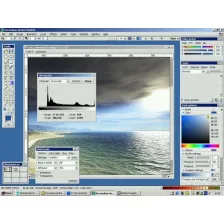
Aurora Photo Editor features a pop-up image selector that lets you preview and tinker with your photo until the desired results are achieved. Amongst the tasks you can perform are re-touch, straighten, adjust color strength, crispness and warmth, crop, zoom and adjust red-eye. The most useful feature is probably the relight tool which seems to magically add new life to photos and bring out colors and details that weren't as clearly visible before.
The user interface in Aurora Photo Editor is very elegant and easy to use.. All of your folders containing photos on your computer are listed down the left-hand side. Selecting any one of them will reveal the photos contained in them on the photo grid. I found that the photos took a while to load into the grid compared to iPhoto or Picasa but it's no big problem.
Once the photos are loaded, Aurora Photo Editor may prompt you to backup all of them to an Amazon database. I was offered the chance to do so for free since I had less than 2GB of photos, which is quite a generous offer. The four main options along the top of the photo grid are: 'Publish', 'Edit', 'Email' and 'Print.' The most important is 'Edit', because this brings up all the main editing options.
What I liked about Aurora Photo Editor is that applying effects is simple and you're given a preview of what your photos will look like across the top of the grid. You can select from different gradients of the effect without having to apply anything. You can, however, get a bit bogged down in the amount of adjustments possible. It's far easier to click 'Auto Relight' and Aurora Photo Editor will automatically detect what will make your photo look better. I also liked the 'Retouch' button, which allows you to doctor images incredibly easily. Want to erase someone from an image? Just click 'Retouch' and select which part of the image you'd like to replace with something generic from elsewhere in the picture.
Meanwhile, publishing in Aurora Photo Editor is integrated with both Flickr and Facebook and emailing is even integrated with online web accounts, such as Windows Live Mail and Gmail.
Overall, I was very impressed with Aurora Photo Editor. It can't make a silk purse out of a pigs ear but if your photo can be improved in any way, Aurora is sure to find it.



























User reviews about Aurora Photo Editor
by Julea Bicaldo
powerful and helpful apps. Thank you so much for the free download.